Ovium is invite-only. Request access and we'll get you set up.
Live TV ยท Google TV & Android TV

Your languages.
Your channels.
One remote.

Ovium brings live Indian TV to the biggest screen in the house: news, entertainment and more in Tamil, Hindi, Telugu, Malayalam, Kannada and other languages. The guide is so simple the whole family can use it with just the remote.

Built for TV remotesUp to 3 TVsNo payment needed
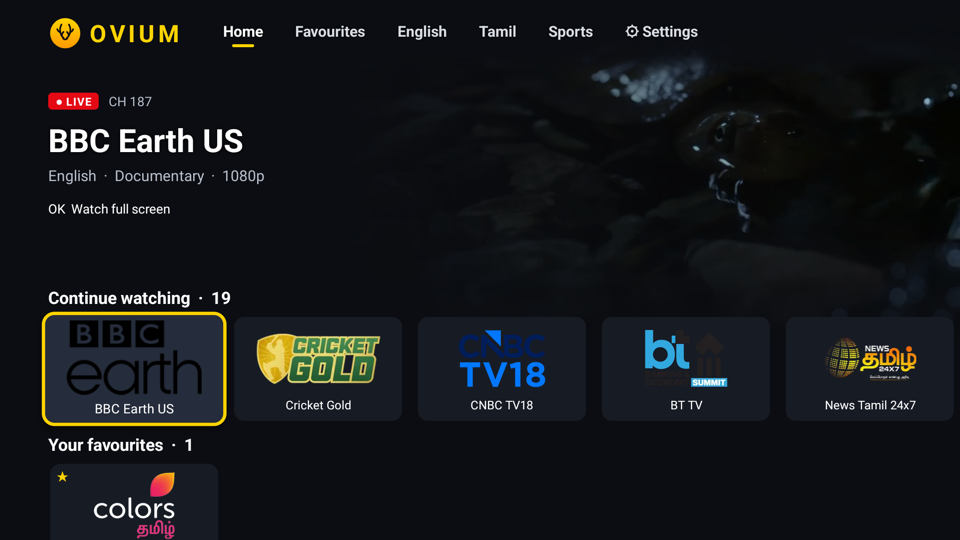
Ovium Home screen: a live preview above rows of channels
Packages

Channels in your language

Every package is included with your access. Pick the languages your family watches, and they appear first on your TV.

The line-up grows as new channels join. Every channel is shown in Ovium with the broadcaster's permission.

Why Ovium

Live TV that feels made for your family

No fiddly menus and no mobile app squeezed onto a TV. Ovium is built for the sofa and the remote.

๐ŸŽ›๏ธ

Just the remote

Arrows and OK do everything. Up and Down change channel, and holding OK saves a favourite.

๐Ÿ—ฃ๏ธ

Your languages first

Pick the languages your family watches. They get their own tabs, with the most popular channels first.

โšก

Live from the first second

Home opens straight into a live preview of your last channel. One press takes it full screen.

๐Ÿ“ˆ

Trending now

Channels rank by what's popular and what your family watches most.

๐Ÿ”

Keeps itself running

If a stream hiccups, Ovium reconnects quietly, and channels that are off air step aside.

๐Ÿ“บ

Every TV in the house

Up to 3 TVs per family. Sign each one in with a short code, with no passwords typed on the remote.

How it works

Watching in three steps

Request access

Fill in the short form. We'll send you a personal invite code.

Install Ovium on your TV

Create your account with the code and download Ovium onto your Google TV or Android TV.

Enter the TV code

Your TV shows a short code. Type it in at /tv and you're watching.

K7Q 2M9
Questions

Good to know

Is there a cost?

No. Access is by invitation and there is nothing to pay.

Which TVs does Ovium work on?

Google TV and Android TV sets and streaming boxes, such as Sony BRAVIA, TCL, Hisense, Philips and Chromecast with Google TV. Samsung and LG TVs aren't supported yet.

Which channels are included?

All the channels in the packages above, in every language. New channels are added to the packages as they join.

How many TVs can I use?

Up to 3 TVs per family. You can see and remove signed-in TVs in your account at any time.

How long does access last?

Your account shows the date your access runs until. We'll extend it for active members.

Do I need a TV Licence in the UK?

Yes. In the UK you need a TV Licence to watch programmes as they're broadcast live, on any channel or device.

Ready to watch?

Tell us your languages and how many TVs you have. We'll send your invite.

Request access